FLEET & CALENDAR
Every boat's bookings in one calendar
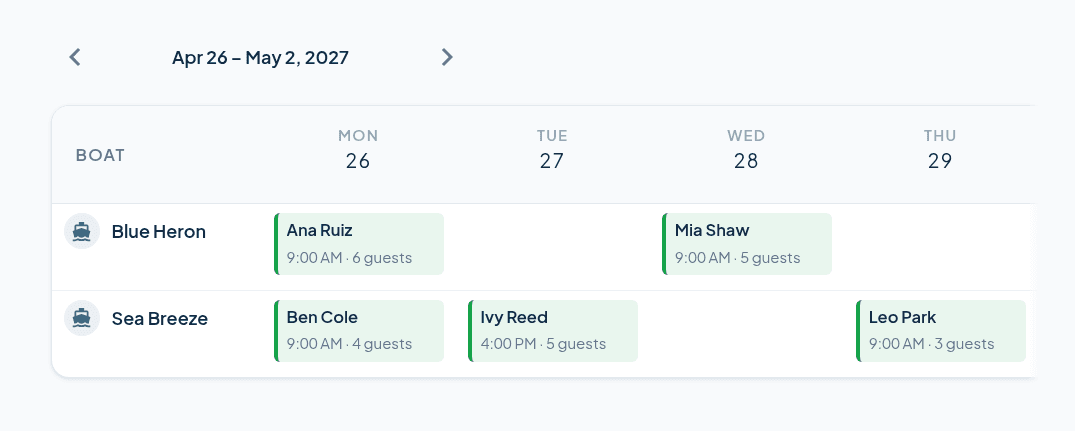
Charterfy shows every boat's bookings by week or month in one reservations calendar, and your crew signs in as an Admin or a Member, on any phone.
Charterfy is charter fleet management software for multiple boats, schedules and crew accounts.
Use it from your dashboard or your AI assistant →Built for the work of the day
Fleet management in Charterfy connects the schedule to the people and vessels that make each trip happen. Add a booking, block out dates or review a reservation from the same dashboard your team uses on the day.
For operators with multiple vessels, this is the operational view. The separate fleet-management page explains the broader workflow for multi-vessel teams; this page focuses on the calendar, crew and day-to-day tools.
Each booking is connected to the right boat and trip. You block out dates in the dashboard under Availability, and the calendar shows every boat's bookings, one row per boat. Booked times come off your calendar automatically. Crew members use the same account, each as an Admin or a Member. Payment and waiver status remain on the reservation, alongside the boat, trip and customer details. You can add a boat or trip, block out dates and review the related reservations from the same account.
- Add multiple boats and block out the dates they aren't running.
- See schedules across the operation instead of checking separate calendars.
- Add your crew as team members, each as an Admin or a Member.
- Manage bookings, waivers and payments against the right boat and trip.
Dashboard or AI assistant
Run your fleet from the dashboard, or connect ChatGPT, Claude, Gemini or Grok over MCP to add and list boats and trips, check availability, or close a date after you confirm the preview. How to connect →
Questions
How many boats can I manage?
Up to 5 boats and 5 team members are included on both plans, with add-ons as your fleet grows. Need more? Talk to us.
What roles can my team have?
Admin or Member. Up to 5 team members are included on both plans, and you can add more for $10/month each.
Where do I block out dates?
In the dashboard, under Availability. The calendar shows bookings, and booked times come off it automatically.